
A 4 GB ISO sits at 80 percent in the browser’s download bar when the Wi-Fi blinks out for two seconds. The bar disappears. Reopening the download starts it over from zero, because a browser tab’s download list was never built to survive a dropped connection. A dedicated download manager fixes exactly that: it splits a file into segments and pulls them at once, resumes automatically after a dropped connection, and keeps a queue running independent of any browser window.
This list only includes tools that are free and currently maintained. That rules out Internet Download Manager, which is shareware at $24.95 after its trial expires, and it rules out EagleGet, which still shows up on plenty of “best free” roundups despite the developer walking away from the project years ago. Installing EagleGet today means running software nobody patches, from a page that says as much if you read past the download button. Four tools survive that filter, and each one earns its spot for a different kind of downloading rather than competing head to head on the same job.
The picks below come from checking each tool’s own changelog, its GitHub or forum activity, and independent write-ups against each other rather than from a single source’s word for it. Where reports on a tool disagree, that disagreement is stated plainly instead of picked for whichever answer reads cleaner.
| Product | Platforms | BitTorrent support | Browser extension needed |
|---|---|---|---|
| Free Download Manager | Windows, macOS, Linux, Android | Yes, built in | Optional |
| JDownloader | Windows, macOS, Linux | No | No, uses clipboard and link detection |
| Motrix | Windows, macOS, Linux | Yes, via aria2 | No, links added manually |
| Xtreme Download Manager | Windows, macOS, Linux | No | Yes, required for auto capture |
The pick for most people: Free Download Manager

Free Download Manager (FDM) splits a file into segments and downloads all of them simultaneously, which is the entire point of running one of these tools instead of a browser. It also runs a full BitTorrent client in the same window, so a magnet link and a regular HTTP download share one queue instead of forcing a second app open. Drag a link out of a browser tab and drop it onto the FDM window and the download starts immediately, no copy and paste required, and an interrupted transfer resumes from where it stopped rather than restarting from zero.
The catch sits in FDM’s history rather than its current build, and it’s worth knowing before installing anything with FDM’s name on it.
Kaspersky’s investigation traced the campaign to one compromised web page rather than the software’s source code, and FDM later published a scanner so anyone running an old Linux install could check for the backdoor. Older bundleware complaints from earlier FDM releases still turn up in forum threads too, though the current installer and the developer’s own site both state the app ships clean now, a claim worth treating as the vendor’s word until an independent source confirms it.
None of that changes the Windows verdict. Get the file through Softoto’s Free Download Manager page and the version that lands on the machine is the genuine, current build, not a mirror of unknown age.
Best for file-hosting sites: JDownloader
JDownloader exists for a narrower job than the other three: pulling files off Mega, MediaFire, and the dozens of one-click hosting sites that a normal browser download handles badly. Paste a page full of links and it sorts them, queues them, and starts pulling, including files sitting behind a captcha it solves on its own. Past that, over 300 plugins cover individual hosting services by name, and finished RAR archives extract automatically once every part has landed.
The tradeoff is a Java-dependent app with an interface that reads like it hasn’t been touched since the mid-2010s, built for someone who already knows what a “premium account” field on a hosting site does. Installation needs the same caution as any free download tool: reports on whether the current installer bundles extra software conflict from one review to the next, and the official site hides its real download link behind decoy buttons designed to send visitors to ad-funded downloads instead. The actual link on the page is plain text, not a graphic button, easy to miss on a first visit.
A clipboard observer runs in the background once JDownloader is open, watching for links copied from a browser and offering to queue them automatically. It works often enough to be useful, though not on every site, and turning it off in the settings is one click if the constant popups get in the way.
Best for torrents without the bloat: Motrix
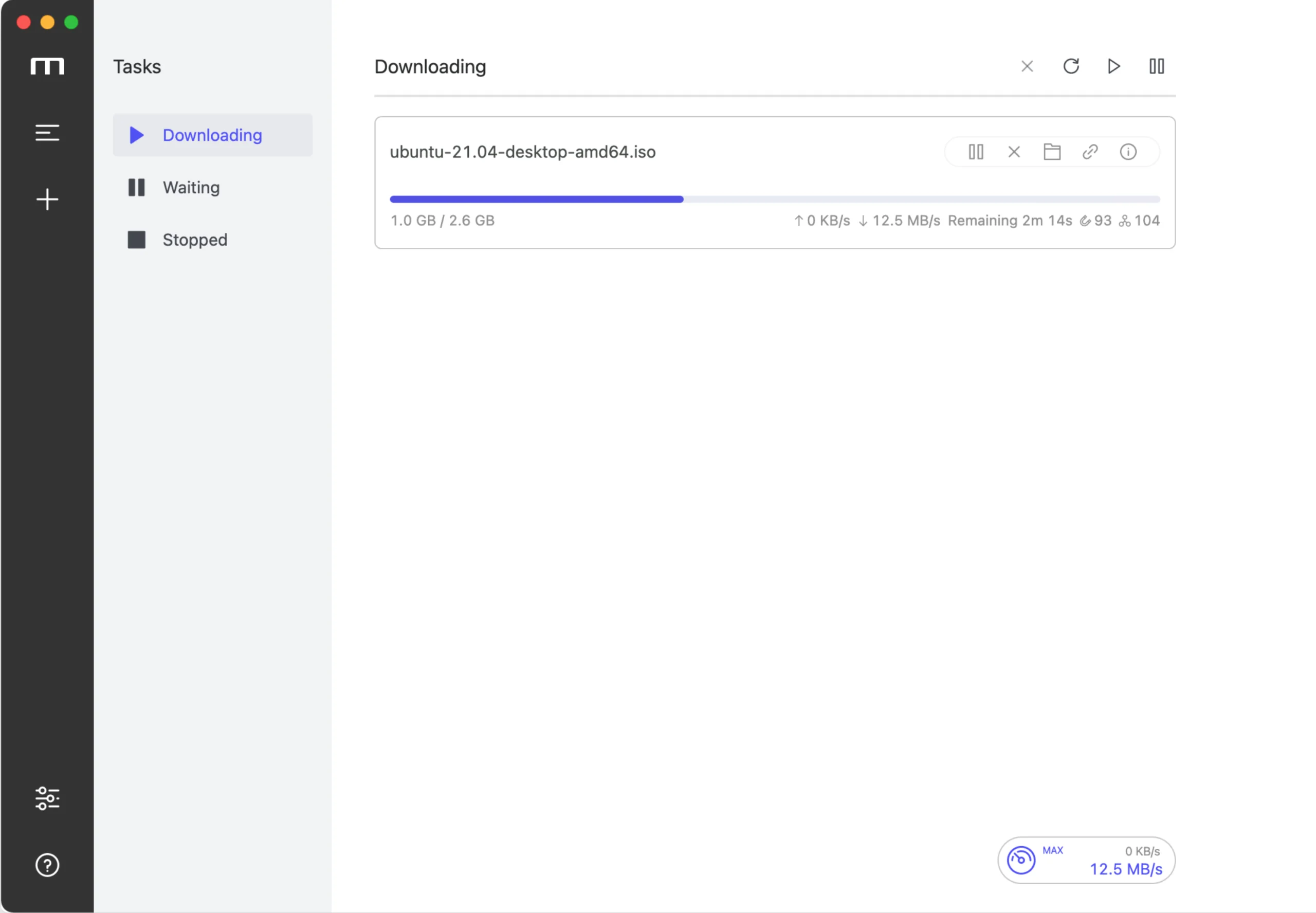
Motrix is a clean interface built on top of aria2, a command-line download engine that has run on servers for years before Motrix put a window around it. It handles HTTP, FTP, BitTorrent, and magnet links from one queue, runs up to ten downloads simultaneously with as many as 64 connections split across each one, and across every source checked for this list, nobody reported ads, bundled toolbars, or an upsell screen anywhere in the install or the app itself. Of the four tools here, it has the cleanest trust record.
What Motrix doesn’t do is automate anything. There’s no browser extension, so every link gets pasted in by hand, and its torrent handling is shallower than a dedicated BitTorrent client. Grab a magnet link and Motrix pulls the whole torrent; picking individual files out before the download starts means using a .torrent file instead of the magnet link, since Motrix has no peer or seed detail view to work from otherwise. It also runs closer to 125 to 130 MB of RAM in the background than a typical lightweight utility, though the number stays roughly flat whether it’s idle or mid-download, since aria2 does the actual work rather than Motrix’s own interface layer.
Best free alternative to IDM: Xtreme Download Manager
Xtreme Download Manager (XDM) is the closest free match to how Internet Download Manager actually works day to day. Install the desktop app, add the matching browser extension, and every downloadable file on a page, video included, gets detected automatically with a one-click grab. The segmentation engine behind it claims download speeds up to 500 percent faster than a single-thread browser pull, and the extension covers Chrome, Firefox, Edge, and Opera.
User reports on that extension are mixed rather than settled either way. Some describe smooth captures on every site they try, others report failed magnet links and an install flow that needs administrator rights to finish without errors. What XDM does have going for it is an open GitHub issue tracker with active development behind it, which is more transparency than the paid alternative offers when something breaks.
Which one should you install
Most people should start with Free Download Manager. It covers ordinary HTTP downloads and torrents in a single app, and Softoto already has the current build ready through its library page. Downloading from Mega or a file-hosting site specifically, JDownloader earns the install despite the dated interface, since nothing else here touches that many hosting services by name. Anyone who wants a genuinely clean, ad-free BitTorrent client paired with a fast downloader should grab Motrix instead of fighting with a heavier app. And anyone coming off a paid IDM subscription who wants the nearest free equivalent, video capture included, should try XDM before anything else on this list.
Get Free Download Manager through Softoto’s library page rather than a random installer link turned up by a search engine, and skip anything claiming to be EagleGet. That project stopped shipping updates years ago, and running it now trades a faster download for software nobody is patching.
A download manager sits closer to the operating system than most apps, watching every file that comes through a browser, which is exactly why FDM’s 2020 incident targeted the installer rather than some unrelated piece of software. Whichever of the four gets installed, leave its auto-update turned on. Skipping updates on this specific category of tool is a worse habit than skipping them on, say, a media player.