
Rating

+4

Category

code-solid

Development & IT

Developer

dev

Don Ho

Languages

Afrikaans, Albanian, Arabic, Azerbaijani, Basque, Belarusian, Bengali, Bosnian, Bulgarian, Catalan, Chinese (Simplified), Chinese (Traditional), Corsican, Croatian, Czech, Danish, Dutch, English, Esperanto, Estonian, Filipino (Tagalog), Finnish, French, Galician, Georgian, German, Greek, Gujarati, Hebrew, Hindi, Hungarian, Indonesian, Irish, Italian, Japanese, Kannada, Kazakh, Korean, Kurdish, Kyrgyz, Latvian, Lithuanian, Luxembourgish, Macedonian, Malay, Marathi, Mongolian, Nepali, Norwegian, Persian (Farsi), Polish, Portuguese, Punjabi, Romanian, Russian, Serbian, Sinhala, Slovak, Slovenian, Spanish, Swedish, Tajik, Tamil, Tatar, Telugu, Thai, Turkish, Ukrainian, Urdu, Uyghur, Uzbek, Vietnamese

Description

Everything you need to know about Notepad++
01

For a free text editor, Notepad++ carries unusual weight: it is the default answer when a Windows user outgrows Notepad but wants no heavyweight IDE. A widely reported attack on its update infrastructure recently shook that trust, so the case for it deserves a fresh look before you download.


Notepad++ covers the gap between Notepad and an IDE for free
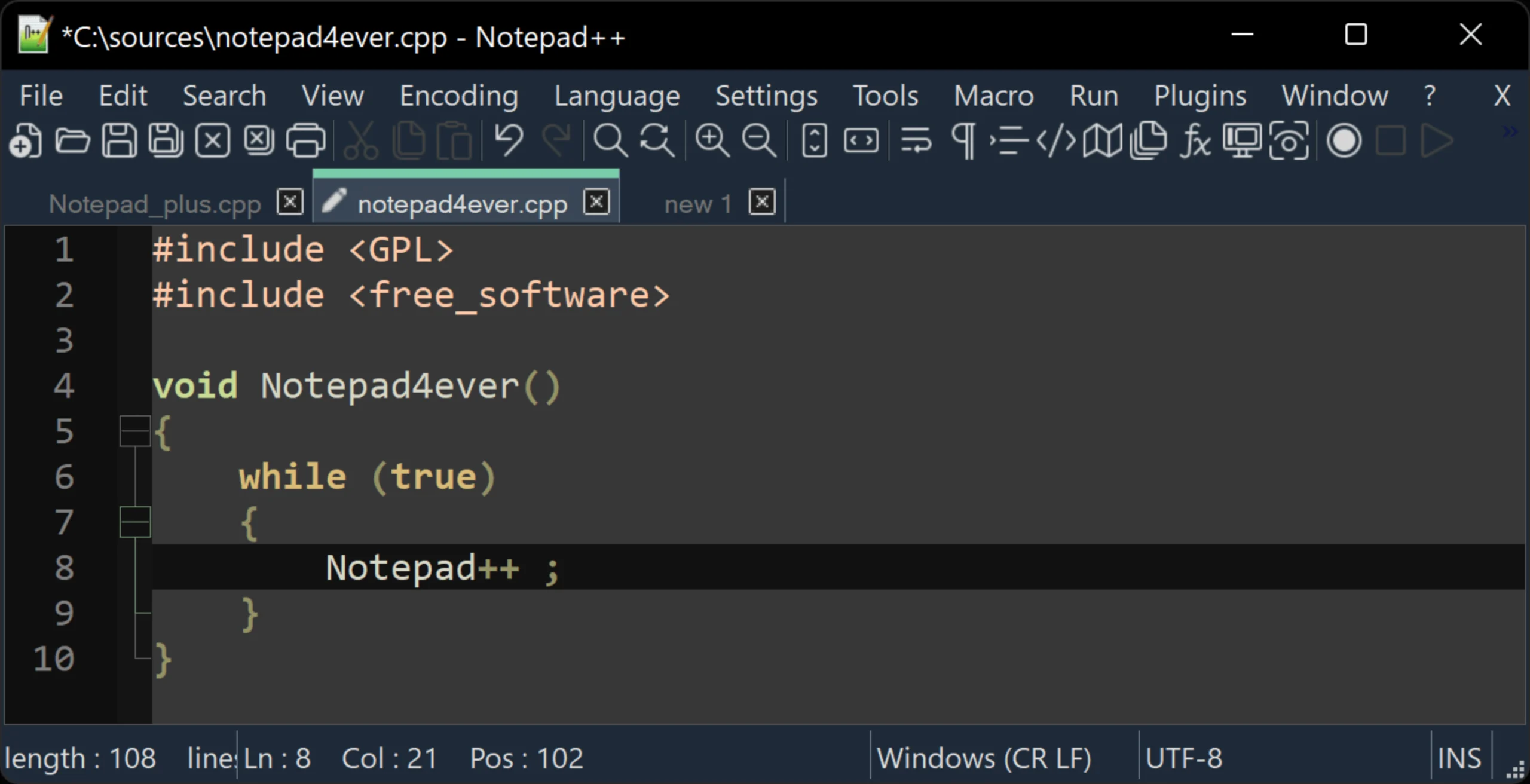
Notepad++ UI screnshot - Dashboard
Screenshot of Notpad++ (https://notepad-plus-plus.org/) by Softoto

The core advantage is speed without ceremony. Notepad++ opens in well under a second because it is native C++ built on the Scintilla editing component, not a browser wrapped around a text box like the Electron apps. That answers the question most people ask before they download Notepad++: why pick it over VS Code when both cost nothing? VS Code is a small IDE; this is the tool for fixing one line without waiting for anything to load. The trust wobble around developer Don Ho’s project deserves a plain telling: attackers compromised its update hosting and redirected some auto-update requests toward malicious servers. The editor’s own code was never breached, and current builds verify update signatures before applying anything. The incident hit the update pipeline, not the editor, and for fast everyday editing on Windows nothing free comes close.


What earns Notepad++ the download over plain Notepad?

Syntax coloring and code folding cover dozens of languages, so a Python script, an HTML page, and a batch file each open readable instead of as a wall of black text. Tabs hold dozens of documents. The quiet star is find and replace: full regular-expression search across every open file at once, turning an hour of manual log cleanup into one careful pattern. Macro recording replays a fiddly edit sequence, and all of it is free with nothing held back for a paid tier. The weak spot is autocomplete, which suggests words without real context awareness, so treat this as a text editor for code rather than a code intelligence tool.


Plugins, macros, and a portable edition stretch the editor further

Well over a hundred community plugins install from the built-in Plugins Admin, adding file comparison, JSON formatting, spell checking, and timed autosave:

  1. Open the Plugins menu and choose Plugins Admin.
  2. Tick the checkbox next to the plugin you want.
  3. Click Install and let the editor restart itself.

The download also comes in a portable edition that runs from any folder or USB stick with no admin rights, a quiet favorite on locked-down office machines. One fact settles many decisions early: Notepad++ is Windows-only, in 64-bit, 32-bit, and ARM64 builds.


Notepad++ next to Sublime Text, VS Code, and UltraEdit

Sublime Text is the closest rival in spirit: also native, also quick, steadier with multi-gigabyte files, but paid after its trial. VS Code wins for project work, bringing debugging, Git integration, and context-aware completion at the cost of a slower start and a larger footprint. UltraEdit courts enterprise users with commercial support, but it is subscription software in a category with excellent free options. The positioning is clean: quick edits on a Windows machine belong to Notepad++, multi-file development belongs to VS Code, and anyone splitting time across operating systems should put their money on Sublime Text.


Native code keeps it quick where Electron editors drag

Built on the Win32 API and Scintilla, the editor launches fast enough to feel instant and idles at a footprint that barely registers in Task Manager. It stays responsive with long documents that make browser-based editors stutter. The ceiling is very large files: logs in the hundreds of megabytes open fine, while multi-gigabyte monsters slow scrolling and search.


Still a first install on a fresh Windows machine

Anyone on Windows who edits text beyond the occasional note should keep Notepad++ around: it costs nothing, weighs almost nothing, and has outlasted a generation of flashier editors. Skip it only if your work lives in multi-file projects with debugging, or if your day is split with a Mac. For everyone else it is an easy call and well worth the download.


It suits Python scripts and quick edits, with coloring, folding, and plugins that run scripts. Notepad++ has no debugger, so big projects fit an IDE better.
Open Source:
Yes
License:
Open Source
Account required:
No
Data collection level:
Not clearly stated
Maintenance status:
Actively maintained
Data collected:
Not clearly stated
Third party data sharing:
Not clearly stated
No logs policy:
Not applicable
Encryption:
Not clearly stated

Pros

  • Starts nearly instantly and stays light with dozens of tabs open
  • Regex find and replace works across all open files
  • Plugins Admin adds comparison, formatting, and autosave tools
  • Completely free and open source under the GPL, with no locked tier

Cons

  • Windows-only, so it cannot follow you to a Mac or Linux machine
  • No autosave out of the box; recovery depends on a backup setting
  • Autocomplete is basic next to VS Code or Sublime Text

Specs

Technical details and system requirements
02

Windows

Version:
8.9.7
File Size:
6.61 MB
Release Date:
July 14, 2026
Windows 7 or later

Verified Source: All specifications, version histories, and download links on this page are checked against the developer's official website before publishing.

Brand

Notepad++

System

Windows

Languages

AfrikaansAlbanianArabicAzerbaijaniBasqueBelarusianBengaliBosnianBulgarianCatalanChinese (Simplified)Chinese (Traditional)CorsicanCroatianCzechDanishDutchEnglishEsperantoEstonianFilipino (Tagalog)FinnishFrenchGalicianGeorgianGermanGreekGujaratiHebrewHindiHungarianIndonesianIrishItalianJapaneseKannadaKazakhKoreanKurdishKyrgyzLatvianLithuanianLuxembourgishMacedonianMalayMarathiMongolianNepaliNorwegianPersian (Farsi)PolishPortuguesePunjabiRomanianRussianSerbianSinhalaSlovakSlovenianSpanishSwedishTajikTamilTatarTeluguThaiTurkishUkrainianUrduUyghurUzbekVietnamese

Changelog

v 8.9.7
July 14, 2026
  • Fix stack buffer overflow vulnerability in expandNppEnvironmentStrs (CVE-2026-54758).
  • Enhance session.xml loading security by normalizing file paths (CVE-2026-52886).
  • Fix updater (WinGUp) path traversal (Zip Slip) vulnerability (CVE-2026-57233).
  • Fix shortcuts.xml macro HMAC bypass issue.
  • Improve robustness of PowerShell command in installer.
  • Fix a "Find in Files" issue.
  • Update Scintilla/Lexilla and pugixml components.
Not available on MAC
Not available on Android
Not available on iOS

Common Problems and Fixes

Troubleshooting Guide for Notepad++
03
Start it with the -nosession switch so it skips reloading the last session; a dead network file the editor keeps trying to reopen is the usual culprit.

Reviews

0 verified user reviews
04
{{ reviewsTotal }}{{ options.labels.singularReviewCountLabel }}
{{ reviewsTotal }}{{ options.labels.pluralReviewCountLabel }}
{{ options.labels.noReviewsLabel }}
{{ options.labels.newReviewButton }}
{{ userData.canReview.message }}

Alternatives

Similar software to Notepad++
05
There are no alternatives available on the website at the moment.

Explore More

Panda Free Antivirus pairs cloud-based malware scanning with a small daily VPN allowance, built for Windows PCs where a heavier suite would slow things down.
Where Chrome and Firefox keep tabs in a single flat row, Vivaldi stacks, tiles, and groups them, alongside a mail and calendar app most browsers skip entirely.
Mozilla Firefox is a free, open-source web browser that runs on its own independent engine, built around strong privacy defaults and deep customization.
Cryptomator adds client-side encryption to any cloud folder you already sync. Free and complete on desktop, read-only on phones until you pay once.
KeePassXC is a free, open source password manager for people who would rather hold their own encrypted file than trust a company's vault. Sync and mobile stay in your hands.
Password manager, VPN, and email alias: normally three extensions. Maxthon bundles them into one browser, from a developer with a China data-sharing history.
ShareX bundles screen capture, recording, and upload automation into one free Windows tool. A dense settings tree decides who should actually install it.
Advanced SystemCare is a Windows system utility that cleans, speeds up, and locks a cluttered PC down in one dashboard, worth weighing against a leaner cleaner.
For anyone who wants Tor-grade anti-fingerprinting on the everyday web, Mullvad Browser is the desktop browser to keep beside the one you use for everything else.

+4

Suitable for all agesContains no objectionable content. No violence, gambling, sexual references, or strong language.

Notepad++: Trust & Privacy Summary

Notepad++ is a free, open-source Windows text/source-code editor licensed under the GPL, with no account required to use it and active, ongoing maintenance including recent security-hardened releases.