
What UC Browser Still Offers
UC Browser still holds roughly half a percent of the world’s browser market, most of it on aging Android phones in markets where mobile data is expensive and storage is tight. That is the whole pitch: a browser built to compress pages and save space, not to compete with Chrome on features. Owned by UCWeb, a subsidiary of Alibaba Group, it works by routing traffic through its own proxy servers before it reaches your device, which is how the compression happens and also where most of the trust questions start.
The app is still being updated, with a fairly recent redesign, a built-in VPN, an ad blocker, and AI translation added to the feature list. Older coverage describes it as Android-only, but the current App Store listing shows an actively maintained iPhone build, updated within days of this writing, so the safest read is to check the store listing itself rather than trust a platform list from a year-old post, this one included by the time you read it.
Speed and Compression: The One Real Strength
Judged only on the job it was built for, UC Browser does it. Pages load fast on weak connections, the data-saving mode is genuinely effective, and the download manager splits files into parts for faster transfers, which is still a rare feature among mainstream browsers. On a low-end phone with a capped data plan, this is a real, measurable benefit, not marketing language.
Where it falls short of a modern browser is everything downstream of loading a page: extension support is minimal, syncing across devices is clunky compared to Chrome or Firefox, and update cadence is inconsistent, which matters more for a browser than almost any other software category.

What’s Free and What’s Behind the Subscription
The core browser, ad blocking, and basic downloading are free. The features most relevant to a privacy-focused reader, the built-in VPN and UC Drive cloud storage, are listed as an optional paid membership on the current App Store page rather than bundled free. That is a reasonable business model on its own. It becomes a problem when the free tier’s own privacy behavior is the thing in question, because paying for a VPN does not fix what the base browser already does with your data before the VPN ever gets involved.

The Trust Problem: Ownership and the Data It Collects
This is where the verdict actually gets decided. UC Browser’s data practices have a documented history. Citizen Lab’s research found the app transmitting IMSI, IMEI, geolocation, and search queries with weak or no encryption, data specific enough to identify a device and its owner on a shared network. UCWeb responded at the time with updated builds and a public reply, but no independent researcher has re-audited the app since, so there is no current, verified confirmation that the underlying approach to data handling has actually changed.
India banned UC Browser in 2020 along with dozens of other apps tied to Chinese companies, citing data privacy and national security. The government confirmed in 2021 that the ban would stay in place, and nothing since suggests it has been reversed. That is not a rumor repeated from old headlines, it is the browser’s current regulatory status in one of its former core markets, and it is a useful signal precisely because a government reviewed the same practices a security researcher would and reached the same conclusion.
Ownership matters here too, not as a guilt-by-association argument but as context: Alibaba operates under Chinese data-sharing law, and a browser routing traffic through its own servers for compression is, by design, in a position to see more of a user’s activity than a browser that does not. That does not make every Alibaba product unsafe. It does mean a browser with this specific architecture and this specific history deserves more scrutiny than the average app, not less.
What the Current Store Listings Actually Say
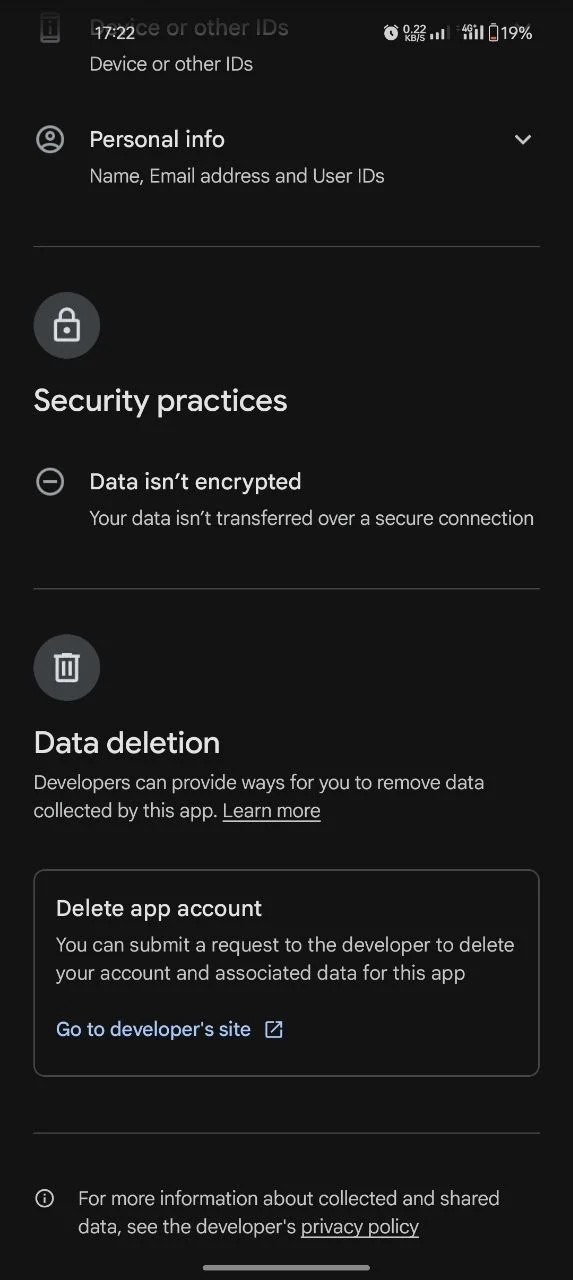
Skip the recycled year-old blog posts and go straight to the source: the Play Store’s Data Safety section, filled in by the developer, lists personal info and web browsing data among the categories collected, and states plainly that the data is not encrypted in transit. It also states that no data is currently shared with third parties, which is worth taking at face value since it is a self-reported claim Google can act on if it turns out false. Combined, that is a developer admitting to a real gap rather than hiding it, which counts for something, but it does not close the gap.
The Verdict
PROS
CONS
UC Browser does its narrow job well and fails the trust criterion badly enough to cap the score regardless of how good the compression is. That is not a technicality in the rating system, it is the point of having one: a browser sees everything you type and everywhere you go, so trust carries more weight here than in almost any other software category. If your main need is squeezing a browser onto a weak connection and you are not doing anything sensitive in it, it will work, and the free tier alone covers that use case. For anything involving accounts, banking, saved passwords, or personal information, that convenience is a real cost for a speed gain that modern alternatives mostly close anyway.
None of this requires giving up the low-data-usage habit that made UC Browser appealing in the first place. Most current browsers ship a data-saver mode of their own now, without the proxy architecture or the unresolved history attached to it.
Mozilla Firefox is the straightforward swap: cross-platform, actively audited, and free. Brave and Opera both add their own privacy angles if Firefox’s defaults feel too plain, and our comparison of the three breaks down which fits which kind of user.


