macOS 27 Golden Gate has the simplest compatibility rule Apple has published in years. If your Mac has an Apple chip, it runs. If it has an Intel processor, it does not. Golden Gate is the first version of macOS that requires Apple silicon, which closes the Intel era on the Mac for good.
That makes the model list short and the checking easy. It also makes the more useful question the one most people only ask after the upgrade finishes: what happens to the software already on the machine.
Every Mac that runs Golden Gate
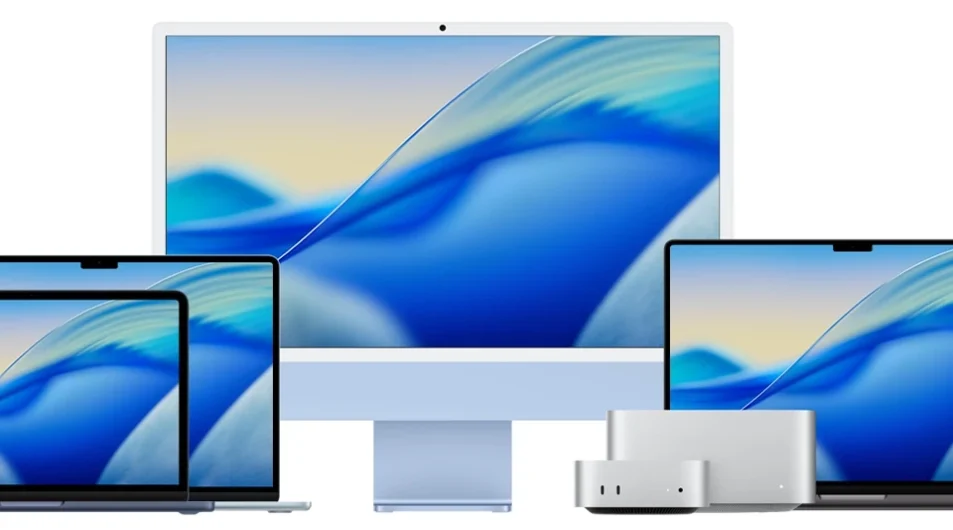
Seven model lines qualify. The tables below take each line from its oldest supported model to its newest. Dates are when Apple introduced the model, drawn from its macOS 27 preview page and Apple’s launch announcements.
MacBook Air
| Model | Introduced |
|---|---|
| MacBook Air 13-inch, M1 | Nov 2020 |
| MacBook Air 13-inch, M2 | Jun 2022 |
| MacBook Air 15-inch, M2 | Jun 2023 |
| MacBook Air 13-inch and 15-inch, M3 | Mar 2024 |
| MacBook Air 13-inch and 15-inch, M4 | Mar 2025 |
| MacBook Air 13-inch and 15-inch, M5 | Mar 2026 |
MacBook Pro
| Model | Introduced |
|---|---|
| MacBook Pro 13-inch, M1 | Nov 2020 |
| MacBook Pro 14-inch and 16-inch, M1 Pro and M1 Max | Oct 2021 |
| MacBook Pro 13-inch, M2 | Jun 2022 |
| MacBook Pro 14-inch and 16-inch, M2 Pro and M2 Max | Jan 2023 |
| MacBook Pro 14-inch, M3 | Oct 2023 |
| MacBook Pro 14-inch and 16-inch, M3 Pro and M3 Max | Oct 2023 |
| MacBook Pro 14-inch, M4 | Oct 2024 |
| MacBook Pro 14-inch and 16-inch, M4 Pro and M4 Max | Oct 2024 |
| MacBook Pro 14-inch, M5 | Oct 2025 |
| MacBook Pro 14-inch and 16-inch, M5 Pro and M5 Max | Mar 2026 |
MacBook Neo
| Model | Introduced |
|---|---|
| MacBook Neo 13-inch, A18 Pro | Mar 2026 |
iMac
| Model | Introduced |
|---|---|
| iMac 24-inch, M1 | Apr 2021 |
| iMac 24-inch, M3 | Oct 2023 |
| iMac 24-inch, M4 | Oct 2024 |
Mac mini
| Model | Introduced |
|---|---|
| Mac mini, M1 | Nov 2020 |
| Mac mini, M2 and M2 Pro | Jan 2023 |
| Mac mini, M4 and M4 Pro | Oct 2024 |
Mac Studio
| Model | Introduced |
|---|---|
| Mac Studio, M1 Max and M1 Ultra | Mar 2022 |
| Mac Studio, M2 Max and M2 Ultra | Jun 2023 |
| Mac Studio, M4 Max and M3 Ultra | Mar 2025 |
Mac Pro
| Model | Introduced |
|---|---|
| Mac Pro, M2 Ultra, tower and rack | Jun 2023 |
Every M-series chip qualifies, M1 through M5, in every configuration. There is no partial support tier, no “runs but without X” asterisk on older Apple silicon, and no exception for high-end Intel hardware. The MacBook Neo is the one machine that breaks the M-series shorthand: it runs an A18 Pro, the chip family Apple builds for the iPhone, and it sits on the list alongside everything else.
One trap hides in those dates. Apple sold Intel and M1 versions of both the MacBook Air and the 13-inch MacBook Pro during 2020, so a model year on its own proves nothing. A 2020 MacBook Air could be either one, and the 2020 13-inch MacBook Pro exists in an M1 version that runs Golden Gate and an Intel version that stops at Tahoe. The chip is what settles it.
Is your Mac Apple silicon or Intel?
Open the Apple menu and choose About This Mac. One line answers the whole question:
Ten seconds, no model-year lookup, and it works just as well on a second-hand Mac whose history you do not know.
The four Intel Macs that stop here
macOS 26 Tahoe supported a handful of Intel machines. Golden Gate keeps none of them. The models losing the upgrade are the 16-inch MacBook Pro from 2019, the 13-inch MacBook Pro from 2020, the 27-inch iMac from 2020, and the 2019 Mac Pro.
None of those Macs stop working the day Golden Gate ships. They stay on Tahoe, which remains a current, patched system for a while yet. What they lose is the forward path: Tahoe is their last major macOS, and every version after this one is built for a processor architecture they do not have.
How long Apple keeps issuing Tahoe security updates is the part nobody can pin down. Coverage puts it at roughly two years, some of it at three, and Apple has committed to no date at all. Plan on the shorter end and treat the machine as usable rather than future-proof.
Supported does not mean every feature arrives
Installing Golden Gate and getting all of Golden Gate are two different things, and the second line sits higher than the first.
Apple Intelligence covers Macs with M1 and later, plus the A18 Pro in the MacBook Neo, so every Mac in the tables above qualifies. The tier over it does not. Apple’s own footnote places Siri voice customisation and improved dictation behind an M3 or later chip with at least 12 GB of unified memory.
That distinction gets blurred in a lot of the coverage, which describes the same requirement as the “advanced on-device Siri model” or the most demanding Apple Intelligence features in general. Apple’s wording is narrower than the paraphrase. If you have an 8 GB M1 or M2 Mac, expect the operating system and Apple Intelligence to arrive normally, with the top voice and dictation tier missing.
The software that stops working
Two changes deserve more attention than the model list, because both hit working setups rather than old hardware.
The first is the removal of Apple Filing Protocol support. AFP is the file-sharing protocol Apple built in the late eighties, and the AirPort Time Capsule depended on it. With AFP gone, network Time Machine backups need a destination that speaks SMB2 or SMB3, and a Time Capsule cannot. Apple posted the warning inside Tahoe’s Time Machine settings over a year ahead, which is more notice than most deprecations get, and it still catches people, because a failed backup is not something you notice until the day you need it.
Check your Time Machine destination before upgrading. An AirPort Time Capsule, or any network drive that only speaks AFP, stops accepting backups on macOS 27, and nothing on screen announces it.
Replacing the destination is less painful than it sounds. A directly attached external drive was always the faster option for Time Machine, and a modern NAS speaking SMB3 covers the over-the-network case. The move to avoid is falling back on SMBv1, which the Time Capsule also understands: it has been disabled by default on macOS for years, for security reasons that have not improved with age.
The second is Rosetta 2, the translation layer that lets Intel-built apps run on Apple chips. It works normally throughout Golden Gate. From macOS 28, expected next autumn, Apple cuts it back to a subset aimed at older unmaintained games that rely on Intel frameworks. General Intel-only apps, plug-ins and extensions stop running at that point.
So this release is the grace year, not the deadline. Open the apps you rely on now and find out which ones are still Intel-only, while there is a full release cycle left to replace or update them. Plug-in ecosystems are where this bites hardest, since a single unmaintained plug-in can hold an entire workflow hostage.
If your Mac did not make the list
An Intel Mac that runs Tahoe well is not a machine to panic about. It is a machine on a clock. Keep it patched, keep a current backup on a drive it can actually reach, and let the replacement decision come from what you need rather than from an upgrade prompt.
When you do move, the software audit matters more than the hardware choice, because any Mac you buy now is Apple silicon anyway. Readers running both platforms may want the Windows side of the same story in our Windows 11 26H2 update rundown.
The compatibility list is settled and will not change. What stays open is whether the Intel-only apps in your dock get native builds before macOS 28 arrives, and Golden Gate is the year to find that out. Start with our Mac software library, where the listed titles run natively on Apple silicon.