
Somewhere in a sealed-off virtual machine, a researcher is deliberately running a fresh piece of malware to watch what it does. Out of that autopsy comes a small pattern, a few bytes present in the malicious file but absent from clean ones. That pattern gets pushed to millions of computers within hours, and from that moment every one of them can recognize this specific threat on sight. That pattern is a virus signature, and it has been the backbone of antivirus software for four decades.
So what is a virus signature, in one sentence? It is a unique fingerprint, usually a distinctive byte sequence or a file hash, that identifies one known piece of malware or one malware family. Your antivirus keeps a database of these fingerprints and compares every file it scans against them. Match found, threat flagged. No match, the file passes.
A virus signature (also called a virus definition) is a unique pattern, typically a byte sequence or file hash, that antivirus software uses to recognize one known piece of malware.
That single idea explains a lot of everyday antivirus behavior: why your security software updates so often, why a full scan is mostly a giant matching exercise, and why a brand-new threat can sometimes walk straight past a fully updated scanner. The matching part is the easy half of the story. The interesting half is what happens when there is nothing to match.
Where the fingerprints come from
Ask how are virus signatures created and the answer is: by hand, more or less. Signatures do not write themselves. When a new malware sample surfaces, analysts at security vendors detonate it inside an isolated environment, a virtual machine or an air-gapped computer, where it can do no real damage. They study the code and the behavior: what files it drops, what it changes, which servers it contacts, what its hash looks like.
From that analysis they carve out the identifying pattern. Sometimes it is a full file hash, a short mathematical summary of the entire file. Sometimes it is a partial pattern, a fragment of code distinctive enough to match the whole family of that malware, including lightly modified copies. Partial patterns matter because attackers rarely release one version of anything; a signature that catches the family beats a signature that catches one file.
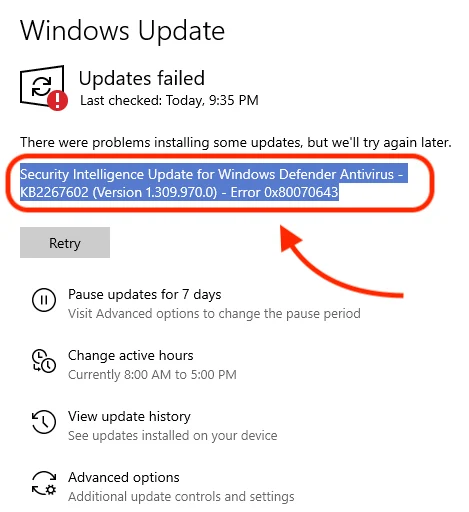
The finished signature joins the vendor’s database, and the update ships to your machine. This is the quiet machinery behind the frequent definition updates your antivirus keeps pulling. On Windows, you can see the trail yourself: open your update history and you will find a stack of security intelligence updates for Microsoft Defender, often more than one from the same day. Each one is a fresh batch of fingerprints for threats that did not exist, or were not known, the day before.
Signature matching has real strengths, which is why it never went away. It is fast, it is precise, and when it fires, it is almost never wrong. A hash match against a known ransomware file is about as close to certainty as detection gets. False alarms are rare, removal is targeted, and the whole check costs your computer very little.
Why can’t antivirus detect new viruses?
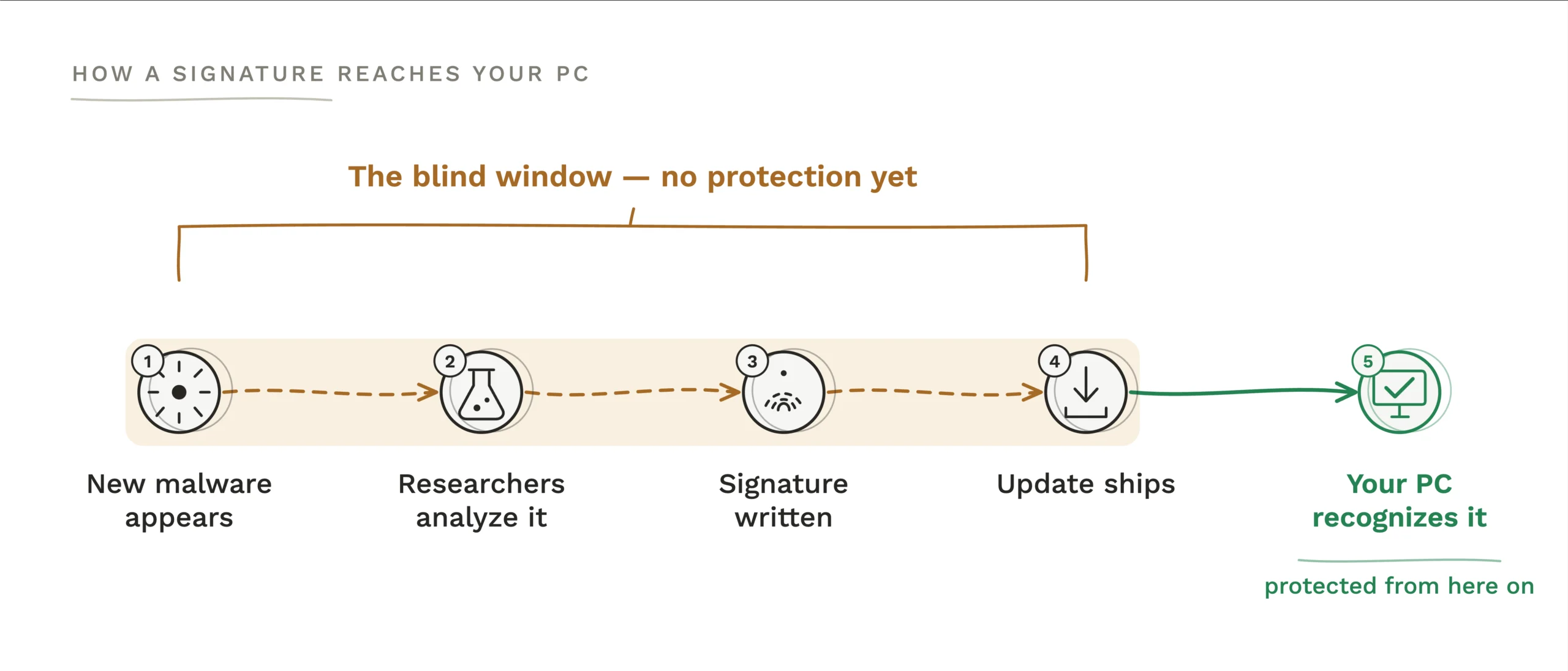
Because a signature can only describe malware that someone has already caught and studied. That is the structural weakness, and it shows up in four ways.
The first is the zero-day gap.
A brand-new threat has, by definition, no entry in any database. Someone has to find it, analyze it, and write the signature before matching can work, and until that update lands on your machine, the scanner is blind to it. That window can run from days for a loud, widespread threat to weeks for quiet, targeted malware, and the new threats keep coming every single day.
The second is polymorphic malware.
What is polymorphic malware? It is malware built to mutate: each time it spreads, it rewrites or re-encrypts parts of itself so the resulting file looks different while doing the same job. One mutation is enough to produce a new hash, and the old signature no longer matches. A single malware strain can generate thousands of variants this way, each one technically unknown. Partial family signatures claw some of this back, but a well-built mutation engine stays ahead of them.
The third is fileless malware.
Signatures are matched against files, and some modern attacks never write one. The malicious code runs directly in memory, or hijacks legitimate tools that are already on your system, the kind of built-in scripting utilities every Windows PC ships with. There is no infected file to fingerprint, so there is nothing for a signature scan to find.
The fourth is plain lag.
Even for ordinary, non-mutating threats, the pipeline from discovery to analysis to shipped update takes time, and a machine that has not pulled the latest definitions is protected against last week’s threats, not today’s. This is why an antivirus with stale definitions gives you far less than its version number suggests, and why updating it is never optional.
Signatures did not retire, they evolved
People reasonably ask: do virus signatures still work? Yes, but the word covers more than it used to, and the technique no longer works alone.
Kaspersky’s own researchers have made the point that classic signatures, in the strict sense of a fixed byte sequence, faded from front-line use roughly two decades ago. What everyone still calls a signature today is usually a smarter database entry, and by their account these entries still make up over half of a modern detection database. The name stuck; the technology underneath moved on.
What moved in alongside it is a set of layers designed to catch exactly what fingerprints miss. The plainest way to put the difference between signature-based and heuristic detection is this: a signature asks “have I seen this exact thing before?”, while a heuristic asks “does this thing look and act like malware?”. A heuristic engine examines a suspicious program’s structure, or runs it briefly in a sandbox, an isolated software environment where it can be watched safely, and looks for malware habits: copying itself, tampering with system files, disabling protections.
Behavioral detection extends the same idea to programs that are already running, watching for hostile actions in real time, which is how the fileless attacks that leave no file behind still get caught. Machine learning models add another layer, trained on millions of known-good and known-bad samples so they can judge a file nobody has ever analyzed. And cloud protection shortens the lag problem: instead of waiting for a scheduled definition download, your scanner can query the vendor’s servers about a suspicious file the moment it appears.
The honest cost of these layers is false positives. A rule that flags “programs behaving suspiciously” will occasionally flag an odd but harmless one, which is why a heavily protected game executable sometimes gets quarantined while genuine malware with a clean track record of one hour slips by. Vendors tune this trade-off constantly. Signatures rarely cry wolf but only know the past; the newer layers can see the future and occasionally see ghosts.
What this means when you choose an antivirus
The practical takeaway is simple: signature matching is a necessary floor, not a finished product. Every serious security tool has it, so it tells you nothing about which one to pick. The differences that matter live in the layers above, in how well a product handles the threats no fingerprint exists for yet.
When you weigh security software, look past the size of the threat database and check for the newer machinery by name: behavior monitoring, heuristic or machine learning detection, cloud-delivered protection, ransomware-specific shields. Independent lab results are largely a measure of how good those layers are, since testing against known samples that every product recognizes proves little. Those lab scores carry real weight in our ranking of the best free antivirus for Windows, if you want the shortlist already done.
And whatever you run, let it update as often as it wants to. The entire signature system depends on your local database staying current, and every definition you skip is a known threat your scanner has agreed to forget. If you are deciding what should guard your PC, start with the security and privacy software in our library, where the protection tools we cover are collected in one place.


